In this digital age, coding has become a fundamental skill that every individual should possess. It is the language that makes it possible to create websites, apps, and software that we use in our daily lives. Coding can seem intimidating for beginners, but it is actually a lot easier to learn than you think.

What is coding and why is it important?
What is coding?
Coding is the process of writing instructions in a language that a computer can understand and execute. These instructions tell the computer what to do and how to do it. There are several different programming languages, each with its own syntax and set of rules.
Why is coding important?
Coding is important because it is the foundation of modern technology. It is the backbone of websites, apps, and software. It is also a valuable skill to have in today’s job market, as there are many careers that require a strong understanding of coding.
Choosing a programming language
Types of programming languages
There are several different types of programming languages, including:
- Object-Oriented Programming (OOP) languages like Java and Python
- Scripting languages like JavaScript and PHP
- Markup languages like HTML and CSS
- Database languages like SQL
Choosing the right programming language
Choosing the right programming language can be overwhelming, but it is important to choose one that fits your goals and interests. If you want to build websites, HTML and CSS are good places to start. If you want to create apps, then consider Java or Python. If you’re interested in data analysis, SQL is a great choice.
Setting up your development environment
What is a development environment?
A development environment is a software application that provides the tools you need to write, test, and debug your code. Some popular development environments include:
How to set up your development environment
To set up your development environment, follow these steps:
Choose a development environment that fits your needs
Download and install the software
Configure the environment to your preferences
Basic syntax and concepts
Variables
A variable is a container in a computer program that stores a value which can be changed later. A variable is usually assigned a name to identify it, such as “x” or “username”. In programming, variables are used to store values such as numbers, text, or other data types.
Data Types
Data types define the type of data that can be stored in a variable. Some common data types include:
- Integer (e.g. 1, 2, 3)
- Float (e.g. 1.0, 2.5, 3.14)
- String (e.g. “Hello World!”, “John Doe”)
- Boolean (e.g. True, False)
Operators
Operators are symbols that perform operations on variables and values. Some common operators include:
- Arithmetic operators (+, -, *, /)
- Comparison operators (>, <, >=, <=, ==, !=)
- Logical operators (and, or, not)
Conditional Statements
Conditional statements are used to execute a specific block of code based on whether a certain condition is met. The most common type of conditional statement is an if statement.
For example:

The code inside the if statement will only be executed if the condition x > 0 is true. If the condition is false, the code inside the else statement will be executed instead.
Hello, World!
The “Hello, World!” program is a simple program that displays the message “Hello, World!” on the screen. It is a great place to start for absolute beginners.

Tips for writing your first program
When writing your first program, keep these tips in mind:
Start with a simple program.
Take your time and don’t rush through the process.
Make sure to understand each line of code and how it works.
Break the problem down into smaller parts and tackle each part one at a time.
Use comments in your code to explain what each section does. This will help you understand the code later on and also make it easier for others to understand if they ever need to work on the code.
Use online resources and forums for help if you get stuck. There is a wealth of information available online, and many experienced coders are happy to help beginners.
Test your code regularly to make sure it is working as expected. If something isn’t working, go back and debug the code to find the problem.
Celebrate your successes! Even small achievements are worth celebrating as they will help build your confidence and motivate you to keep learning.
Why learning to code is more important than ever with the release of ChatGPT
The recent release of OpenAI’s ChatGPT language model has further emphasized the importance of learning to code in today’s digital world. ChatGPT is a cutting-edge artificial intelligence technology that can understand and respond to natural language text. This technology has the potential to revolutionize the way we interact with computers and has far-reaching implications for a wide range of industries, from customer service to education.
However, the development of such advanced technologies like ChatGPT requires a deep understanding of coding and computer science. The engineers who built ChatGPT used their coding skills to create a complex system that can understand and respond to human language. This demonstrates just how critical coding skills are for shaping the future of technology.
In addition, the increasing reliance on technology in our daily lives means that there is a growing demand for individuals who have the skills to create and maintain these technologies. Companies across a variety of industries are seeking individuals who are proficient in coding to help build and improve their digital products and services. As a result, individuals who have coding skills are in high demand and have a competitive edge in the job market.
Furthermore, learning to code is not just important for those pursuing careers in technology. It is also a valuable skill for individuals who want to understand how technology works and how they can use it to solve problems in their own lives and communities. Coding is a way to bring your ideas to life, and it can help you develop a more critical and creative mindset that can be applied to a wide range of fields and disciplines.
In conclusion, with the release of ChatGPT and the continued growth of technology, learning to code has never been more important. It is a valuable skill that will help you stay ahead in the job market and better understand the world around you. So if you’re interested in shaping the future of technology and want to develop a valuable skill, consider learning to code today.
Give 3 practice beginner code exercises
- Fizz Buzz: Write a program that prints the numbers from 1 to 100. But for multiples of three print “Fizz” instead of the number and for the multiples of five print “Buzz”. For numbers which are multiples of both three and five print “FizzBuzz”.

Explanation: In this program, we are using a for loop to iterate through the numbers 1 to 100. The if statement checks if the number is a multiple of both 3 and 5, and if so, it prints “FizzBuzz”. If it’s only a multiple of 3, it prints “Fizz”, and if it’s only a multiple of 5, it prints “Buzz”. If none of the conditions are met, the program prints the number.
- Reverse a string: Write a program that takes a string as input and returns its reverse.

Explanation: In this program, we defined a function reverse_string that takes a string as input and returns its reverse. We are using slicing to reverse the string, by using the syntax s[::-1]. The input_string variable is set to “hello”, and the program outputs the reverse of the string, which is “olleh”.
- Palindrome check: Write a program that checks if a given string is a palindrome (a word that reads the same backward as forward).

Explanation: In this program, we defined a function is_palindrome that takes a string as input and returns True if it is a palindrome, and False otherwise. The program uses the slicing method as in the previous example, but instead of returning the reverse of the string, it compares it to the original string. If the two are the same, it returns True, indicating that the input string is a palindrome. The input_string variable is set to “racecar”, and the program outputs True, indicating that the string is a palindrome.
3 Beginner Code Exercises for Building a Website
Building a Simple Website:
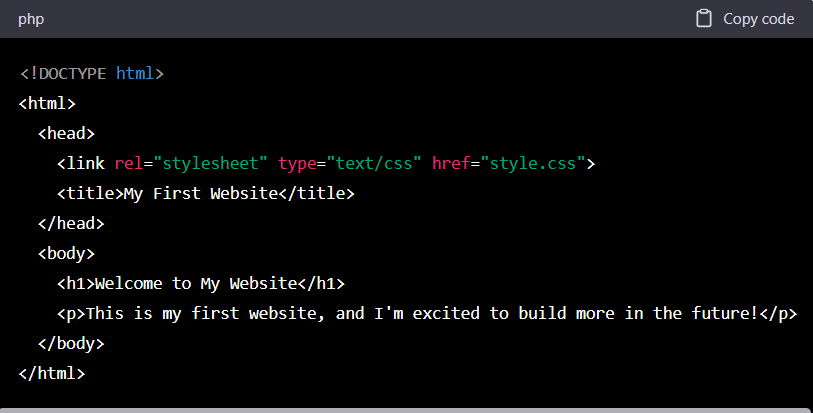
Create a basic website with a title, header, and body text.

Explanation: This is a basic HTML file that creates a website with a title, header, and body text. The <!DOCTYPE html> declaration specifies the type of document being used, in this case, HTML5. The <html> element is the root element of the document and contains all other elements. The <head> element contains information about the document, such as the title, which is displayed in the browser tab. The <body> element contains the content that is displayed on the page, including a header with <h1> and a paragraph with <p>.
Adding a stylesheet:
Create a stylesheet to add style to the website.
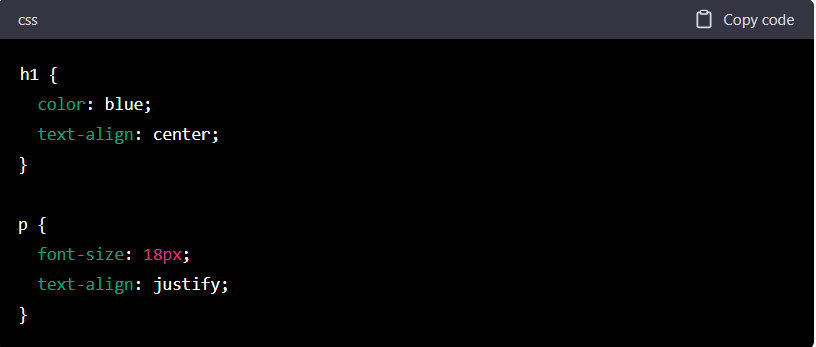
Explanation: In this example, we added a stylesheet to our website to add some style. The <link> element in the <head> section of the HTML file references the stylesheet file, which is named “style.css” in this example. The CSS file contains styles for the header and paragraph elements. The h1 selector sets the color to blue and aligns the text to the center, while the p selector sets the font size to 18px and aligns the text to be justified.
Adding a navigation bar:
Create a navigation bar with links to other pages on the website.
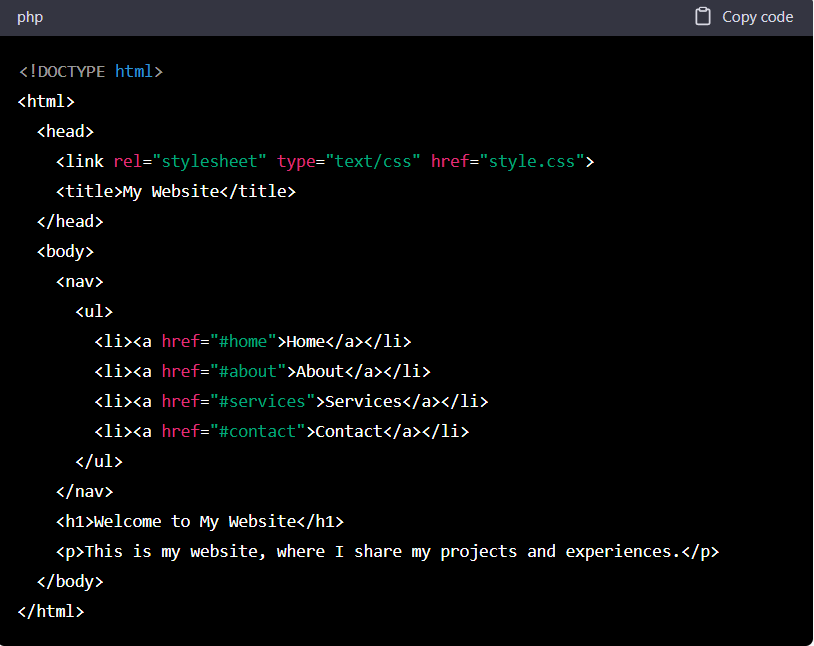

Explanation: In this example, we added a navigation bar to our website. The `<nav>` element is used to define a section for the navigation bar. Within the `<nav>` element, we use an unordered list `<ul>` to list the navigation links. Each navigation link is defined as a list item `<li>` and is wrapped in an anchor tag `<a>` with a specific `href` attribute that refers to the corresponding page on the website. The CSS file contains styles for the navigation bar, such as a light gray background color, the links being displayed in a row with equal spacing between them, and the links being black and not underlined.
 AI Insights
Leave a comment